About Word Labs
A research-informed spelling and vocabulary platform built by a NSW primary school teacher, for Australian primary classrooms.
What is Word Labs?
Word Labs is a browser-based literacy platform designed for primary school students. It develops three core areas of spelling knowledge — phonological awareness, orthographic knowledge, and morphological awareness — through structured, gamified activities that students can use independently or with their class.
Students earn quarks, unlock scientist outfits, and build streaks while practising skills that directly transfer to spelling accuracy, vocabulary growth, and reading comprehension. Teachers get a real-time dashboard with accuracy heatmaps, intervention flags, and individual student profiles — making it easy to see which students need targeted support and in which specific skill area.
Word Labs was built by a practising NSW public primary school teacher in response to the absence of effective, curriculum-aligned digital tools for explicit spelling instruction. Every activity is grounded in what actually works in real classrooms, not retrofitted from abstract theory.
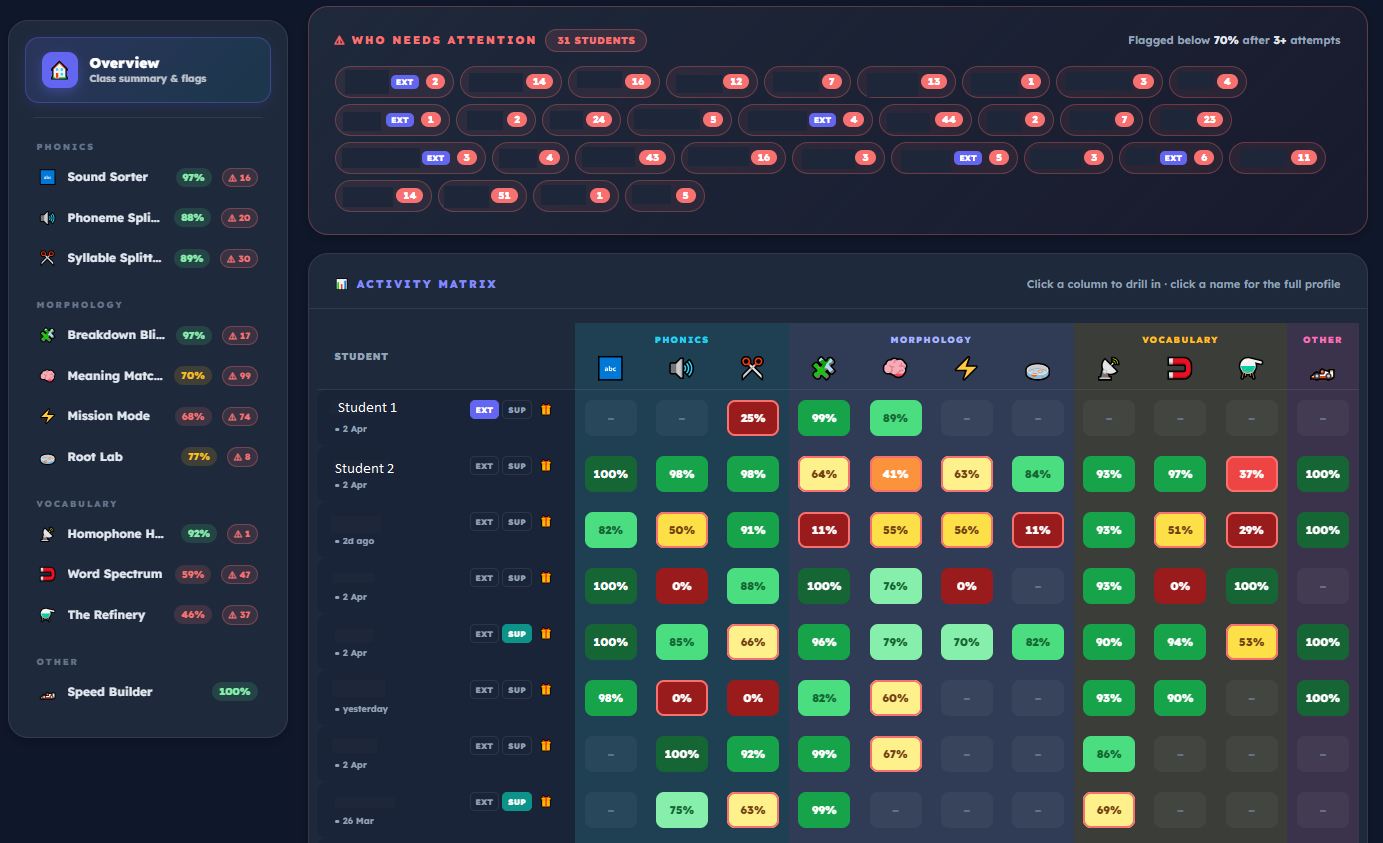 The teacher dashboard — every student, every activity, at a glance.
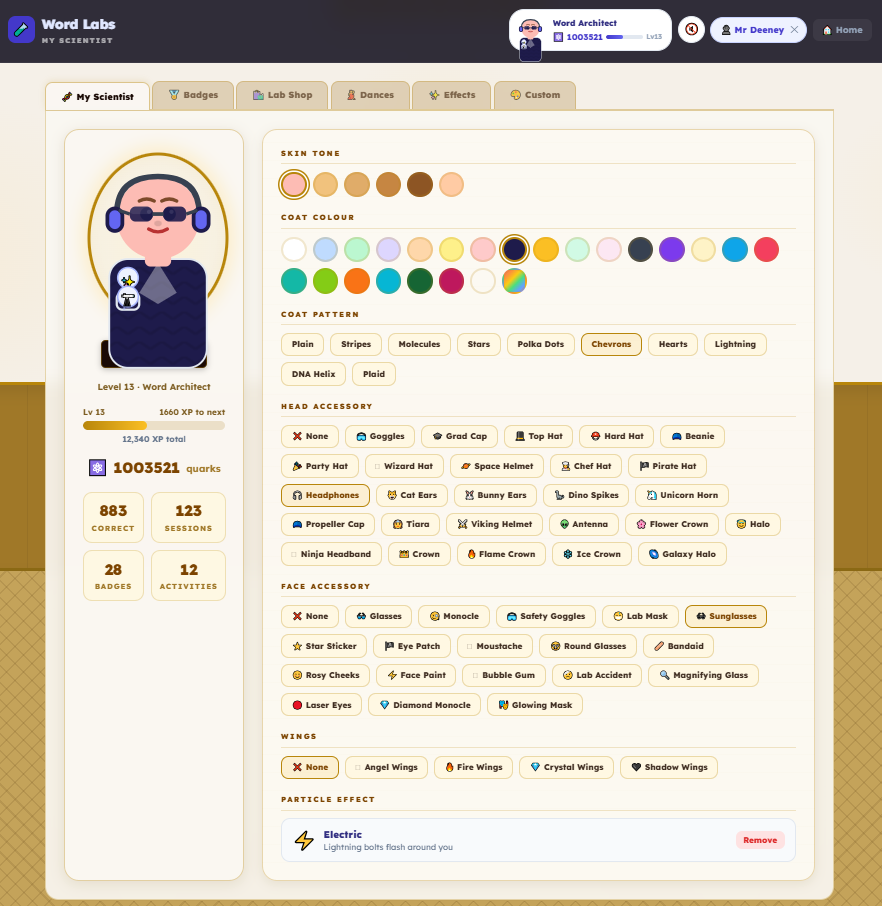 Students earn quarks and customise their scientist — the engagement loop that brings them back every day.
The Three Domains of Spelling
Effective spelling instruction requires students to coordinate three interrelated forms of word knowledge. This framework is well established in structured literacy research and is reflected across the NSW English K–10 Syllabus. Word Labs is built around all three domains.
Phonological
The ability to hear and manipulate the sound structure of words — including syllables, onset and rime, and individual phonemes. Students who can segment spoken words into syllables and phonemes can break complex words into manageable parts before attempting to spell them. This is an essential foundation for encoding and decoding written language.
Orthographic
Knowledge of common letter patterns, grapheme-phoneme correspondences, and spelling generalisations — including understanding that the same phoneme can be represented by different graphemes (e.g. the /ay/ sound in say, rain, make, eight). Building orthographic knowledge allows students to make principled choices when spelling unfamiliar words.
Morphological
Understanding of meaningful word parts — bases, prefixes, suffixes, and roots — and how they connect to form and change meaning. Morphological knowledge supports vocabulary development, reading comprehension, decoding, and content-area learning across all KLAs. Students who understand that construct, instruct, and destruction share a common root can read and spell a much wider range of words.
These three domains are not taught in isolation — they are interrelated and mutually reinforcing. A student segmenting the word misleading into syllables (phonological) can then identify the grapheme patterns in each syllable (orthographic) and recognise the prefix mis- and the base lead (morphological). Word Labs activities are designed to develop all three, individually and in combination.
Research Base
Word Labs draws on a well-established body of research in spelling and literacy development. The platform reflects the following evidence-based principles.
Explicit instruction matters. Spelling is not best learned through incidental exposure or rote memorisation. Students benefit from explicit teaching of phonological, orthographic, and morphological features of words — with metalanguage used to name and discuss those features. Teaching students the language to describe how words work empowers them to develop conscious, transferable strategies rather than memorising words one at a time.
Morphological awareness is highly generative. For every word a student knows deeply, they can infer the meaning of many related words through morphological analysis. Explicit instruction in morphological awareness has been shown to significantly improve both spelling accuracy and reading comprehension, particularly in the middle and upper primary years. Teaching morphemes gives students tools that scale — a student who understands the prefix trans- can make sense of dozens of words they have never encountered before.
Poor spelling has real cognitive costs. Difficulty with spelling acts as a cognitive distraction from the higher-order skills required for writing. Students who struggle to encode words pause more frequently mid-word, which slows overall writing time and reduces compositional quality. This means spelling instruction is not just about accuracy — it is about freeing up the cognitive capacity students need to write with complexity and craft.
Word knowledge develops across three tiers. Vocabulary development moves from common everyday words through academic vocabulary to specialist, discipline-specific terms. Word Labs activities — particularly The Refinery — explicitly develop students' ability to move between these tiers, building the vocabulary range and precision that strong writers and readers need across all subject areas.
Built by a practising teacher. Word Labs is not a commercial product repurposed for education. It was designed from the ground up by a NSW public primary school teacher with a focus on structured literacy and evidence-based spelling instruction. Every activity maps to a specific instructional purpose grounded in the research above.
Differentiation, Targeted Practice and HPGE
Word Labs is designed to support the full range of learners in a primary classroom — from students who need targeted intervention to students identified as high potential and gifted. Differentiation is built into the platform at every level, not added as an afterthought.
Extension Mode — supporting high potential and gifted students. Extension Mode is a teacher-activated setting that can be toggled on per individual student directly from the class dashboard. When enabled, the student's activities automatically load a more challenging dataset — harder morphemes, rarer phoneme patterns, abstract academic word pairs, and more complex vocabulary tasks. In Morpheme Builder and Mission Mode, the morpheme pool expands to include Latin and Greek derivational morphemes, assimilated prefixes, and low-frequency academic bases. In Phoneme Splitter and Sound Sorter, less common grapheme-phoneme correspondences and multisyllabic words are introduced. In Word Spectrum, synonyms and antonyms move from high-frequency everyday pairs to academic and technical vocabulary. In The Refinery, extension clines move from concrete verbs to more abstract academic language. Extension Mode provides genuine curriculum extension — not just more of the same — in a way that is invisible to the student and requires no extra preparation from the teacher. This directly supports schools' obligation to provide differentiated learning for high-potential and gifted students.
Custom Word Lists — targeted practice for specific students or groups. Teachers can create custom word lists from the Teacher Dashboard and assign them to individual students, small groups, or the whole class. Custom lists flow directly into relevant activities — words added to a list appear in the Morpheme Builder word bank, the Breakdown Blitz challenge set, and the Flashcard deck. This means a teacher working with a student on a specific spelling pattern (for example, words with assimilated prefixes, or words ending in -tion and -sion) can build a targeted list and have that student practise those exact words in multiple activity contexts without creating separate resources. Custom lists can be built around a current class text, a curriculum topic, or an individual student's identified error patterns from a work sample analysis.
Intervention groups — identifying and responding to need. The Teacher Dashboard displays accuracy heatmaps and intervention flags for every student across every activity and morpheme category. When a student falls below 70% accuracy in a specific category after three or more attempts, an intervention flag is automatically raised. Teachers can use this data to form small, targeted intervention groups — for example, pulling together three students who are all flagging on the same suffix category for a focused 10-minute group session, then assigning them a custom word list in that area to practise independently. The dashboard also shows which students have Extension Mode active, making it easy to track differentiated cohorts at a glance and report on HPGE provision.
Adjustable challenge within activities. Several activities include difficulty tiers that students can select or that teachers can set as defaults — for example, Phoneme Splitter offers Starter, Level Up, and Challenge modes, and The Refinery offers Fill the Gap (supported) and Full Cline (independent) modes. This allows the same activity to be used simultaneously across a mixed-ability class, with each student working at an appropriate level of challenge without the teacher needing to manage multiple different tasks.
Low-stim mode — sensory accommodations. Teachers can enable low-stim mode per class from the dashboard. This turns off sounds, animations, particle effects, streak flames, leaderboards, and gamification rewards while keeping all game mechanics and progress tracking intact. Students still answer questions, earn progress data for the teacher dashboard, and move through activities as normal — the experience is simply calmer, with no flashing feedback, sound effects, or visual distractions. Designed for students with sensory processing differences, autism spectrum conditions, ADHD, or anyone who benefits from a quieter, distraction-free learning environment. Low-stim mode can be toggled on and off at any time without affecting student data.
EALD support — 48 languages with translation and natural audio. Word Labs includes built-in support for students learning English as an Additional Language or Dialect (EALD). Teachers can activate EALD mode per student from Class Setup and select the student's home language from 48 available languages. Once enabled, students see a "Show in [language]" flip button alongside every word and morpheme across all activities — they engage with the English first, then tap to reveal the translation in their home language when they need support. Each game also provides audio pronunciation in both English and the student's home language, powered by Google Cloud Neural2 text-to-speech for natural, clear pronunciation. Translations are generated by AI and cached automatically, so teachers don't need to prepare any additional resources. This makes Word Labs accessible to the full diversity of an Australian classroom — a student who speaks Vietnamese at home can practise English morphemes with the same activities as the rest of the class, with their home language available as a scaffold rather than a barrier. EALD support currently covers Arabic, Bengali, Cantonese, Czech, Danish, Dutch, Farsi, Filipino, Finnish, French, German, Greek, Gujarati, Hebrew, Hindi, Hungarian, Icelandic, Indonesian, Italian, Japanese, Kannada, Khmer, Korean, Malay, Malayalam, Mandarin Chinese, Marathi, Norwegian, Polish, Portuguese, Punjabi, Romanian, Russian, Samoan, Spanish, Swahili, Swedish, Tamil, Telugu, Thai, Tibetan, Turkish, Ukrainian, Urdu, Vietnamese, and more.
Together these features make Word Labs a practical tool for the differentiated spelling block — one platform that supports a teacher working with a group at the back of the room while the rest of the class works independently at their own level, generating real-time data that informs the next lesson.
NSW English K–10 Syllabus Alignment
Word Labs activities are directly aligned to the spelling outcomes of the NSW English K–10 Syllabus. The syllabus organises spelling knowledge across three integrated components — phonological, orthographic, and morphological — which map exactly onto the three domains Word Labs develops.
Stage 2 — EN2-SPELL-01 (NESA, 2022) requires students to select, apply and describe appropriate phonological, orthographic and morphological generalisations and strategies when spelling in a range of contexts.
Word Labs supports this through segmentation of multisyllabic words into syllables and phonemes (Syllable Splitter, Phoneme Splitter), applying grapheme-phoneme correspondences (Sound Sorter), identifying inflected and derivational suffixes (Morpheme Builder, Breakdown Blitz, Mission Mode), and applying common prefixes including un-, re-, and dis- (Meaning Match-Up, Mission Mode).
Stage 3 — EN3-SPELL-01 (NESA, 2022) requires students to automatically apply taught phonological, orthographic and morphological generalisations and strategies when spelling, and to justify spelling strategies used for unfamiliar words.
Word Labs supports this through applying and explaining graphemes identified by their etymology (Root Lab), using spelling conventions for derivational suffixes such as -ion, -ian, -ence and -ous (Morpheme Builder, Breakdown Blitz), applying knowledge of assimilated prefixes such as in-, ad- and com- (Mission Mode, Extension Mode), and correctly applying homophones in writing contexts (Homophone Hunter).
Component A of the NSW Literacy Continuum identifies Knowledge of Words as a foundational element of spelling development, spanning phonological, graphological, morphemic, and etymological knowledge. Word Labs activities directly address all four dimensions. The teacher dashboard helps teachers identify where individual students sit across these dimensions and target activities to match their current learning needs.
Australian Curriculum v9.0 Alignment
Word Labs aligns with the Australian Curriculum v9.0 English strand across primary years, particularly the following areas.
Phonics and word knowledge — Word Labs develops students' knowledge of grapheme-phoneme correspondences, syllabification strategies, and morphemic word structure. Sound Sorter, Syllable Splitter, and Phoneme Splitter directly target the phonics and word knowledge content descriptions, building the automaticity students need to apply these skills in authentic writing contexts.
Vocabulary — The Refinery, Word Spectrum, Morpheme Builder, and Meaning Match-Up develop students' vocabulary range and precision — including understanding of word relationships, synonyms, antonyms, word clines, and how morphological structure signals meaning. This directly supports content descriptions requiring students to understand word families, derivational relationships, and shades of meaning across primary years.
Creating written texts — By building automaticity in spelling and broadening vocabulary knowledge, Word Labs supports students in devoting cognitive capacity to the higher-order demands of composing effective written texts — consistent with the literacy strand's emphasis on applying word knowledge purposefully in writing.
Teacher Resources
Word Labs includes a comprehensive library of teacher resources designed to be used alongside the digital activities — supporting explicit teaching, guided practice, and independent reinforcement in a structured spelling block.
Teacher-led or student-led. Every activity in Word Labs can be used in two ways. In Teacher Mode, the teacher opens an activity from their landing page and leads the class through it — there are no timers, no XP or rewards, no auto-advance, and rich feedback is shown after every answer to support whole-class or small-group discussion. Teachers choose how many words to cover and click Next when ready to move on. In Student Mode, students work independently at their own pace with gamified feedback, round-based word counts, and progress tracked to the teacher dashboard. This means the same activity can be used as a guided teaching tool during explicit instruction, then assigned as independent practice — with no extra setup required.
355 teaching slide decks — one for every morpheme. Word Labs provides 355 downloadable PPTX teaching slide decks — one for each of the 41 prefixes, 32 suffixes, and 282 base words and roots in the system. Each deck follows a consistent 3-day instructional sequence: Day 1 introduces the morpheme with meaning, word identification, teacher-guided explanation, and short practice tasks; Day 2 includes dictation of 2 focus words followed by breaking them into morphemes, syllables, and phonemes; Day 3 extends to dictation of 3 focus words, morpheme/syllable/phoneme splits, and a word matrix to complete. A printable template worksheet is available to use alongside any slide deck. All decks are also available with EALD translations for multilingual classrooms. Decks are ready to project on a classroom screen and require no preparation — just download and teach.
Printable worksheet generators for 9 activity types. Teachers can generate and print customised worksheets for Morpheme Builder, Breakdown Blitz, Phoneme Splitter, Syllable Splitter, Sound Sorter, Meaning Match-Up, Mission Mode, Root Lab, and The Refinery. Each generator produces formatted PDF-ready sheets that match the corresponding digital activity, making it easy to set offline practice that reinforces what students are doing on screen. Worksheets can be customised with custom word lists — the same lists that feed into the digital games — so the offline and online practice align perfectly.
EALD translation support across all resources. Every worksheet generator supports an optional translation column for students with an EALD language set. When enabled, the worksheet automatically includes translations in the student's home language alongside the English content, drawn from the same AI-generated translation system used in the digital activities. This means a teacher can print a worksheet for a Vietnamese-speaking student that includes Vietnamese translations without creating a separate resource.
Printable login cards. From Class Setup, teachers can print a formatted sheet of student login cards — one per student — showing the school name, class code, student name, and their 3-character login code. Cards are formatted for A4 in a 3-column grid, ready to cut and distribute.
Online and offline, connected. The teaching slide decks, printable worksheets, and digital activities all draw from the same morpheme and word data. A teacher can introduce a prefix with the slide deck on the projector, hand out printed worksheets for guided practice, and then have students consolidate independently on the digital activities — all covering the same content with no extra preparation. This makes Word Labs a complete spelling block resource, not just a screen-based tool.
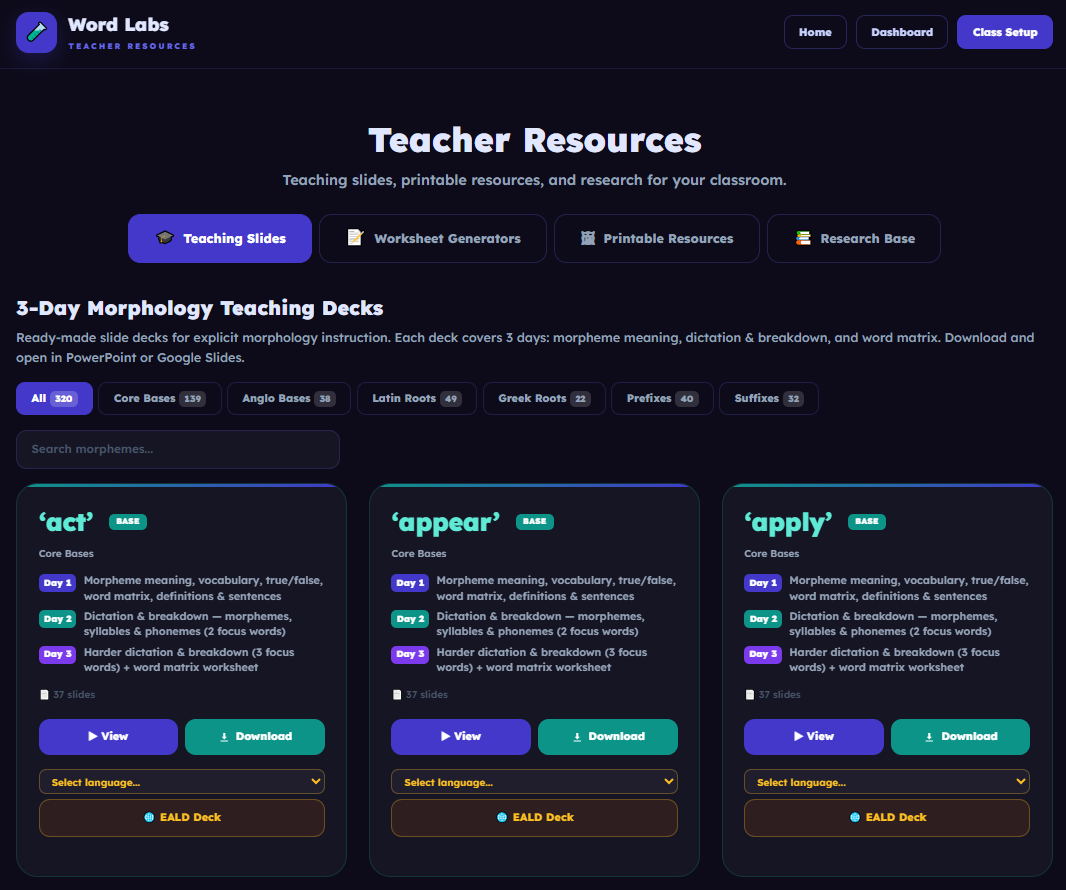 355 teaching slide decks — one for every morpheme, ready to project on a classroom screen.
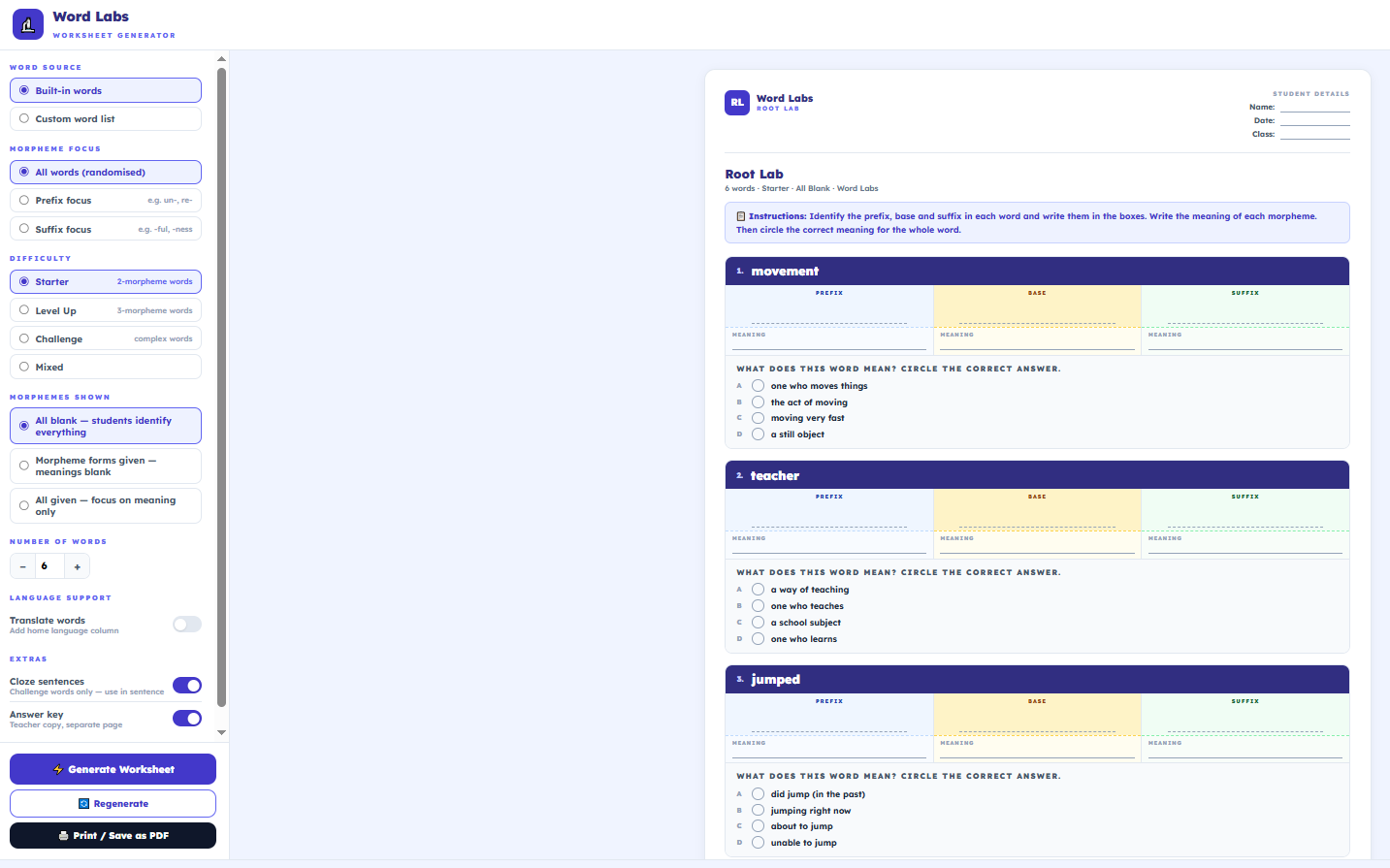 Worksheet generators produce PDF-ready sheets that match the digital activities and support EALD translations.
All resources are available from the Teacher Resources page (sign-in required).
Activities at a Glance
Each activity targets a specific domain of spelling knowledge. Together they provide comprehensive coverage of phonological, orthographic, and morphological development. Students choose how many words to practise per round (10–30), giving every game a clear finish point.
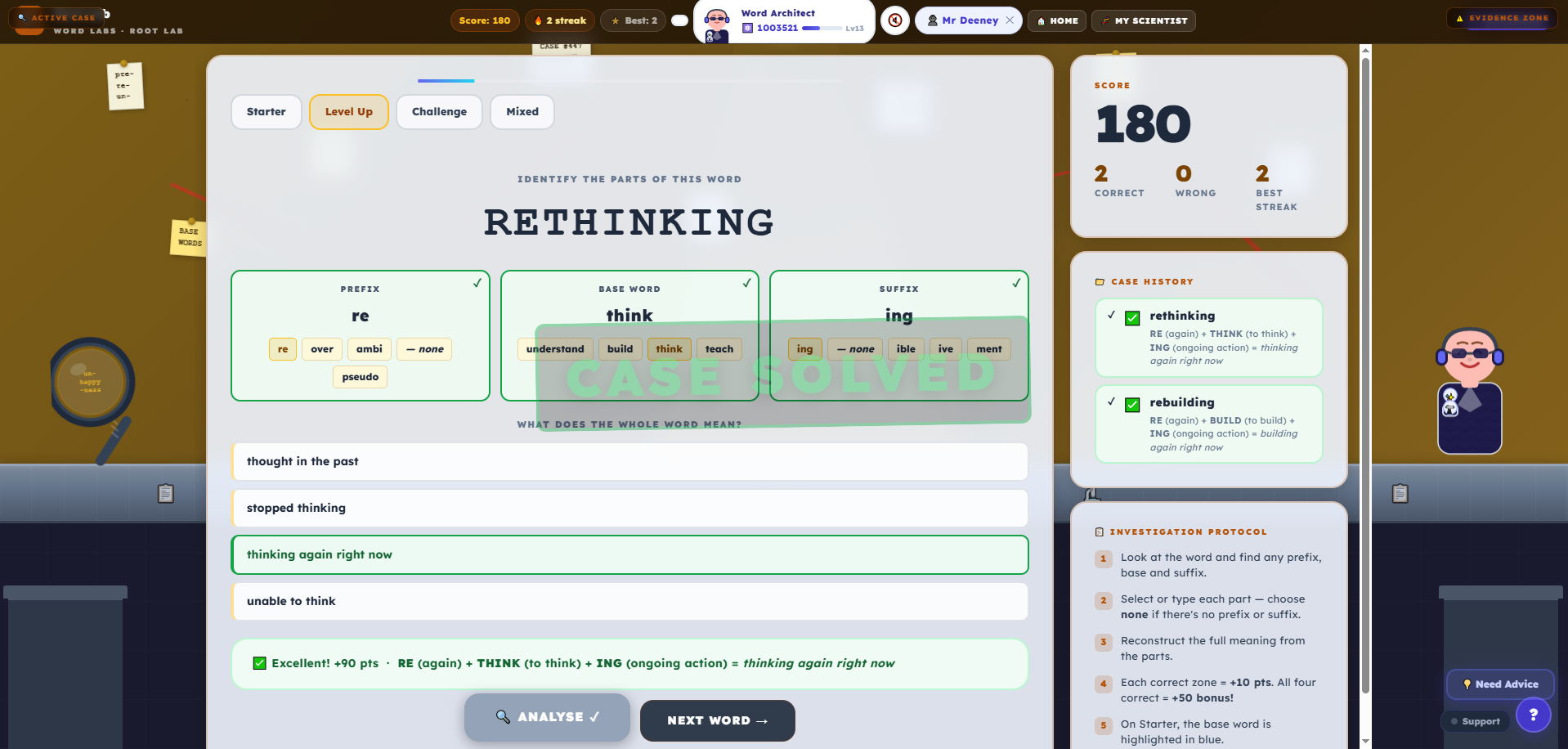 Every activity is built around explicit, research-grounded morphology and phonics practice.
References and Further Reading
Beck, I. L., McKeown, M. G., & Kucan, L. (2013). Bringing Words to Life: Robust Vocabulary Instruction (2nd ed.). Guilford Press.
Bear, D. R., Invernizzi, M., Templeton, S., & Johnston, F. (2012). Words Their Way: Word Study for Phonics, Vocabulary, and Spelling Instruction (5th ed.). Pearson.
Carlisle, J. F. (2010). Effects of instruction in morphological awareness on literacy achievement: An integrative review. Reading Research Quarterly, 45(4), 464–487.
Daffern, T. (2016). Using metalanguage to teach spelling: A contribution to explicit spelling instruction. Australian Journal of Language and Literacy, 39(3), 207–218.
Daffern, T. (2018). What happens when a teacher uses cognitive strategy instruction to teach spelling? Australian Journal of Learning Difficulties, 23(2), 153–173.
Daffern, T. (2021). Spelling in the Classroom: A Teacher's Guide to the Science and Practice of Spelling Instruction. Routledge.
Nagy, W., & Anderson, R. C. (1984). How many words are there in printed school English? Reading Research Quarterly, 19(3), 304–330.
NSW Education Standards Authority. (2022). English K–10 Syllabus. NESA.
NSW Education Standards Authority. (2023). NSW Literacy Continuum K–10. NESA.
Sumner, E., Connelly, V., & Barnett, A. (2016). The influence of spelling ability on handwriting production: Children with and without dyslexia. Journal of Experimental Psychology: Learning, Memory, and Cognition, 42(9), 1481–1495.
Word Labs was designed around the structured literacy evidence base. For questions about curriculum alignment or research underpinning the platform, contact nick@wordlabs.app.